
We have selected a tool to create and organize Podcast sessions for the different KCI brands. The tool is called Riverside.fm and can be used to create, manage and edit recordings. Depending on the type of the recording we give it a name like podcast, interview, webinar, live event or another name.
See below the different steps in the Podcast/recording process.
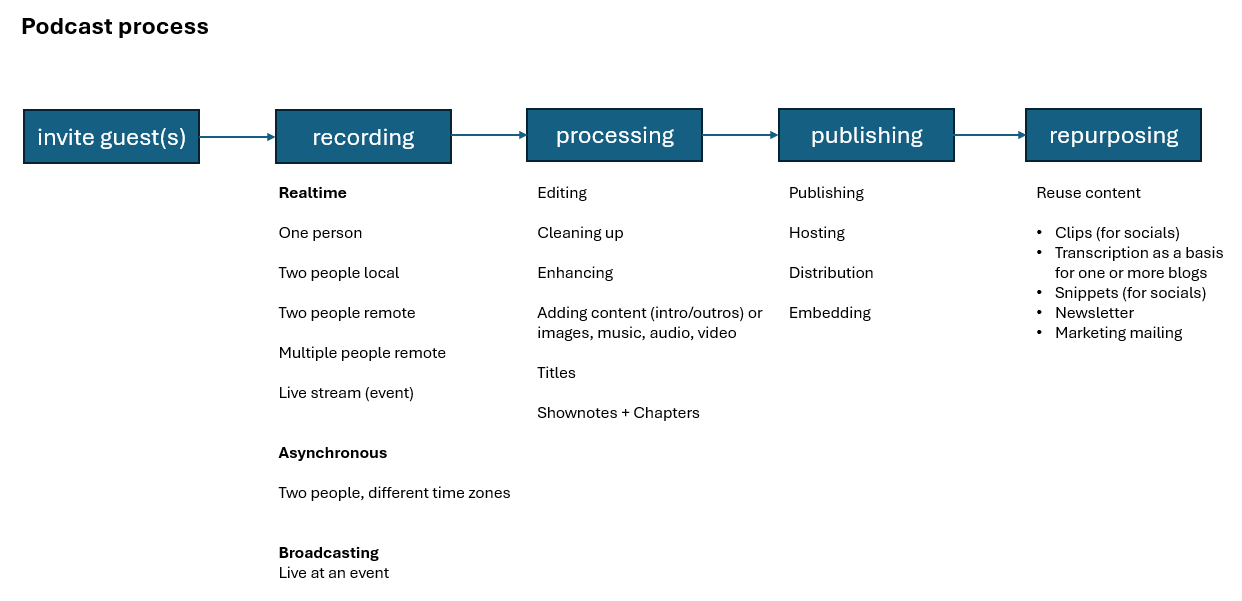
We have created a Riverside subscriptions. This is KCI-Host@kci-world.com. For Publishing and repurposing we need (party) other tools as these functions are not in Riverside.fm.
For storing our podcasts, mainly large files sizes, we selected an online service rss.com. This service offers several functions like storing your podcast files and it gives options to distribute our podcasts to many other platforms like YouTube, Spotify and more.
Quick Start #
To quickly start a Podcast session login to the KCI-Host@kci-world.com account, setup your settings like headphone Y/N, camera and microphone. Then invite guests by using the build-in Riverside.fm invitation mechanism.
The build in Riverside.fm invitation mail is branded with the Riverside.fm brand. So alternatively it’s better and more professional to use a KCI brand branded email. These can be created in Stripo.email, our email design tool.
Podcasts can be scheduled by using the schedule option. Also it’s possible to live stream to other platforms like Facebook, X, YouTube, LinkedIn, Twitch, and TikTok. There’s an app for mobile phones to participate as guest or even organize a recording session.
Once a recording has finished, it can be editted in Riverside. You can add text, remove texts, add caption, subtitles or you can add music, images and videos. Its also possible to create so called 30 second ‘magic clips’ that can be shared on social media.
The forst podcasts can be found here: https://stainless-steel-world.net/podcast.


